I want to explore the capability of the OpenShift MCP server. My first use case is to run the OpenShift MCP server and integrate with Claude. Then, I will explore how to configure OpenShift Lightspeed to use the OpenShift MCP server with Claude as the LLM model next.
Deploy OpenShift MCP Server
Prerequistes:
- OpenShift 4.22 cluster
- oc logged in as a user who has cluster-admin permission
- Helm 3.x
- Pull access to registry.redhat.io
- An MCP client (Cursor or Claude Code, for example)
Step 1: Add OpenShift Helm Repo
- helm repo add openshift-helm-charts https://charts.openshift.io/
- helm repo update
- helm search repo redhat-openshift-mcp-server
Output from the terminal:
$ helm repo add openshift-helm-charts https://charts.openshift.io/
"openshift-helm-charts" has been added to your repositories
$ helm repo update
Hang tight while we grab the latest from your chart repositories...
...Successfully got an update from the "openshift-helm-charts" chart repository
...Successfully got an update from the "advanced-workflows" chart repository
...Successfully got an update from the "rh-ecosystem-edge" chart repository
...Successfully got an update from the "stackrox" chart repository
...Successfully got an update from the "rhacs" chart repository
...Successfully got an update from the "stable" chart repository
...Successfully got an update from the "airbyte" chart repository
Update Complete. ⎈Happy Helming!⎈
$ helm search repo redhat-openshift-mcp-server
NAME                                             	CHART VERSION	APP VERSION	DESCRIPTION
openshift-helm-charts/redhat-openshift-mcp-server	0.3.0        	latest     	Helm Chart for MCP server for Red Hat OpenShift
Step 2: Define the MCP server hostname for ingress access
$ APPS_DOMAIN=$(oc get ingresses.config.openshift.io cluster -o jsonpath='{.spec.domain}')
$ echo "mcp-server.${APPS_DOMAIN}"
Step 3: Install the OpenShift MCP server with full access (you can set read-only access optionally)
- Recommended for most cases — binds the chart ServiceAccount to the built-in
viewClusterRole. - Full cluster access (only if you intentionally want write/admin capabilities)
- Defaults are already
core+configin read-only mode. Other toolsets from the 4.22 docs includenetedge,helm,metrics,ossm,kubevirt,tekton. - Run the command below in your terminal
$ helm upgrade -i -n openshift-mcp-server --create-namespace openshift-mcp-server \
  openshift-helm-charts/redhat-openshift-mcp-server \
  --set openshift=true \
  --set ingress.host=mcp-server.${APPS_DOMAIN} \
  --set-json 'config.toolsets=["core","config","kubevirt","metrics"]' \
  --set-json 'rbac.extraClusterRoleBindings=[{"name":"admin-access","roleRef":{"name":"cluster-admin","external":true}}]'
Note: Available toolsets: config, core, helm, kcp, kubevirt, metrics, netedge, openshift, ossm, tekton. Defaults to core, config.
Output from terminal:
$
helm upgrade -i -n openshift-mcp-server --create-namespace openshift-mcp-server \
  openshift-helm-charts/redhat-openshift-mcp-server \
  --set openshift=true \
  --set ingress.host=mcp-server.${APPS_DOMAIN} \
  --set-json 'config.toolsets=["core","config","kubevirt","metrics"]' \
  --set-json 'rbac.extraClusterRoleBindings=[{"name":"admin-access","roleRef":{"name":"cluster-admin","external":true}}]'
Release "openshift-mcp-server" does not exist. Installing it now.
NAME: openshift-mcp-server
LAST DEPLOYED: Wed Jul 29 14:15:00 2026
NAMESPACE: openshift-mcp-server
STATUS: deployed
REVISION: 1
NOTES:
Thank you for installing redhat-openshift-mcp-server 0.3.0.

MCP server for Red Hat OpenShift has been deployed successfully.

For more information, visit: https://github.com/openshift/openshift-mcp-server
Step 4: Verify the deployment
$ oc get pods,svc,route -n openshift-mcp-server
NAME                                                                  READY   STATUS    RESTARTS   AGE
pod/openshift-mcp-server-redhat-openshift-mcp-server-85578d446xtqj6   1/1     Running   0          10s

NAME                                                       TYPE        CLUSTER-IP       EXTERNAL-IP   PORT(S)    AGE
service/openshift-mcp-server-redhat-openshift-mcp-server   ClusterIP   172.30.223.187   <none>        8080/TCP   4m12s

NAME                                                                              HOST/PORT                                      PATH   SERVICES                                           PORT   TERMINATION     WILDCARD
route.route.openshift.io/openshift-mcp-server-redhat-openshift-mcp-server-hgpjr   mcp-server.apps.demo.sandbox1576.opentlc.com   /      openshift-mcp-server-redhat-openshift-mcp-server   http   edge/Redirect   None

$ oc logs openshift-mcp-server-redhat-openshift-mcp-server-85578d446xtqj6 --tail=50
I0729 21:19:05.621429       1 http.go:163] "HTTP server starting on port 8080 (endpoints: /mcp, /sse, /message, /healthz, /stats, /metrics)"
Get the route URL:
$ oc get route -n openshift-mcp-server -o jsonpath='{.items[0].spec.host}{"\n"}'

mcp-server.apps.demo.sandbox1576.opentlc.com
Step 5: Connect my OpenShift MCP server with Claude code
Create a .mcp.json file similar to the one shown below
{
  "mcpServers": {
    "openshift": {
      "type": "http",
      "url": "https://mcp-server.apps.demo.sandbox1576.opentlc.com/mcp"
    }
  }
}
Smoke test from a terminal:
$ curl -k -sS -o /dev/null -w "%{http_code}\n" \
  "https://mcp-server.${APPS_DOMAIN}/healthz"
200
Integrate OpenShift MCP Server with Claude Code
Step 1: Run the following command to add a kubeconfig token for cluster access.
$ claude mcp add --transport stdio --env KUBECONFIG=$HOME/.kube/config openshift -- npx openshift-mcp@latest

  Thought for 3s (ctrl+o to expand)

⏺ That command looks correct now. After running it, verify the server connected:

  claude mcp list

  You should see openshift listed with a ✔ Connected status. If it connects successfully, restart your Claude Code
  session and the OpenShift MCP tools will be available automatically.

  If it fails to connect, try running the server command directly to see any errors:

  npx openshift-mcp@latest
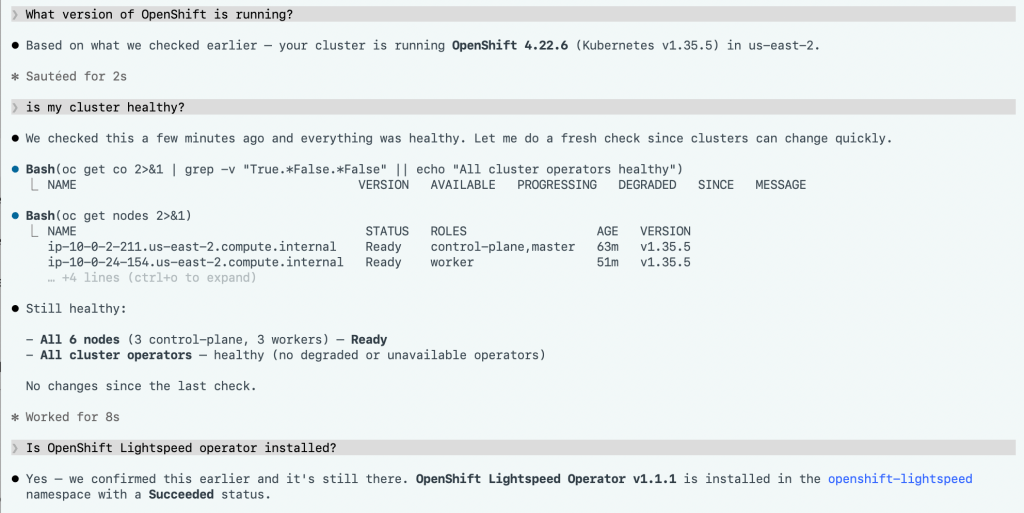
Step 2: Let’s test out the Claude code and OpenShift MCP integration.
Setting up OpenShift LightSpeed to use OpenShift MCP server
Step 1: Create a GCP service account JSON key file
- Go to GCP Console and create a project
- Enable billing on that project
- Enable the Vertex AI API
- Go to IAM & Admin —> Server Accounts —> Create server account
- Grant at least Vertex AI User (roles/aiplatform.user
- Go to service account —> Keys tab
- Add key —> create new key —> JSON —> create
- Download the JSON key file locally.
Step 2: Create a secret with the JSON key file as shown below
$ oc create secret generic llmcreds --from-file=gcp-service-account.json=/Users/shannachan/projects/gcloud/mytest-xxxxxx.json -n openshift-lightspeed

secret/llmcreds created
Step 3: Create an OLSConfig CR file that has “mcpServers” as part of the configuration shown below. In th case of OpenShift LightSpeed, you will also has at least one LLM provider configured.
spec:
  featureGates:
    - MCPServer
  mcpServers:
    - headers:
        - name: Authorization
          valueFrom:
            type: kubernetes
      name: openshift-mcp-server
      timeout: 30
      url: 'http://openshift-mcp-server.openshift-mcp-server.svc.cluster.local:8080/mcp'
  llm:
    providers:
      - credentialKey: gcp-service-account.json
        credentialsSecretRef:
          name: llmcreds
        googleVertexAnthropicConfig:
          location: us-east5
          projectID: mytest-xxxxx
        models:
          - name: claude-sonnet-4-5
        name: google-anthropic
        type: google_vertex_anthropic
  ols:
    defaultModel: claude-sonnet-4-5
    defaultProvider: google-anthropic

