High Level Steps:
- Create a ROSA classic 4.16.4 cluster
- Install AWS Controllers for Kubernetes – Amazon S3 operator
- Create a bucket via the ACK controller Operator
Step-by-Step guide:
- Create a ROSA classic cluster 4.16.4. I have recorded my command for my test below using the default option per the ROSA documentation.
$ rosa login --token="<my-token>"
$ rosa create ocm-role
$ rosa create user-role
$ rosa list account-roles
$ rosa create account-roles
$ rosa create oidc-config --mode=auto --yes
$ rosa create operator-roles --prefix demo --oidc-config-id <oidc-id>
$ rosa create cluster --sts --oidc-config-id <oidc-id> --operator-roles-prefix demo --sts --mode auto
Visit the link in the Reference section for details. In my test, I used a new AWS account and had to enable the ROSA service from the AWS management console. Also, I already have a Red Hat Hybrid cloud console (OCM) account.
- Create a cluster admin via OCM.
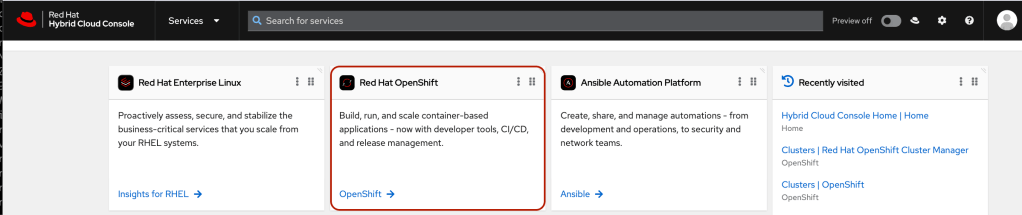
- Click on the Red Hat OpenShift tile from the OCM landing page
- Click on the newly created cluster

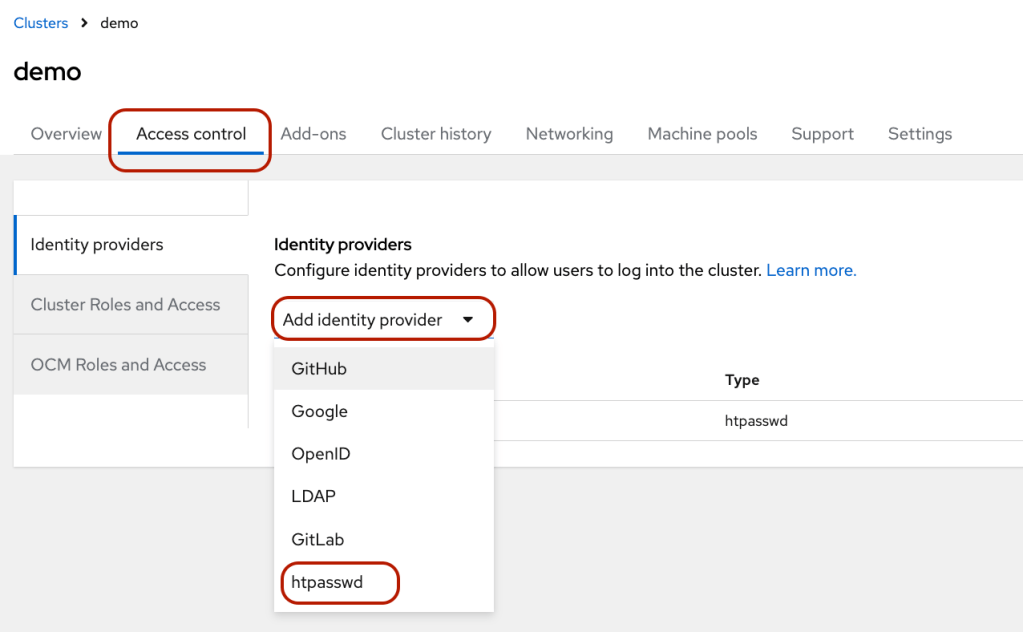
- Click Access Control tab and select htpasswd under the “Add identity provider”
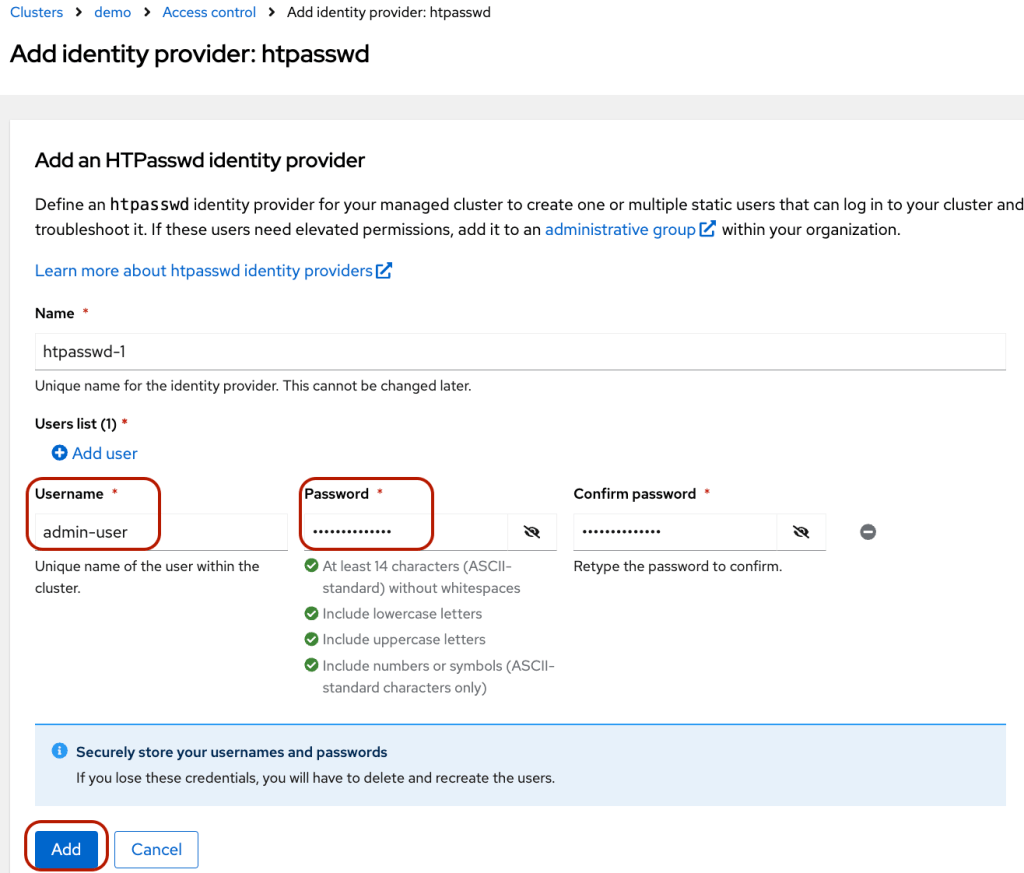
- Add user and password information and click “Add”
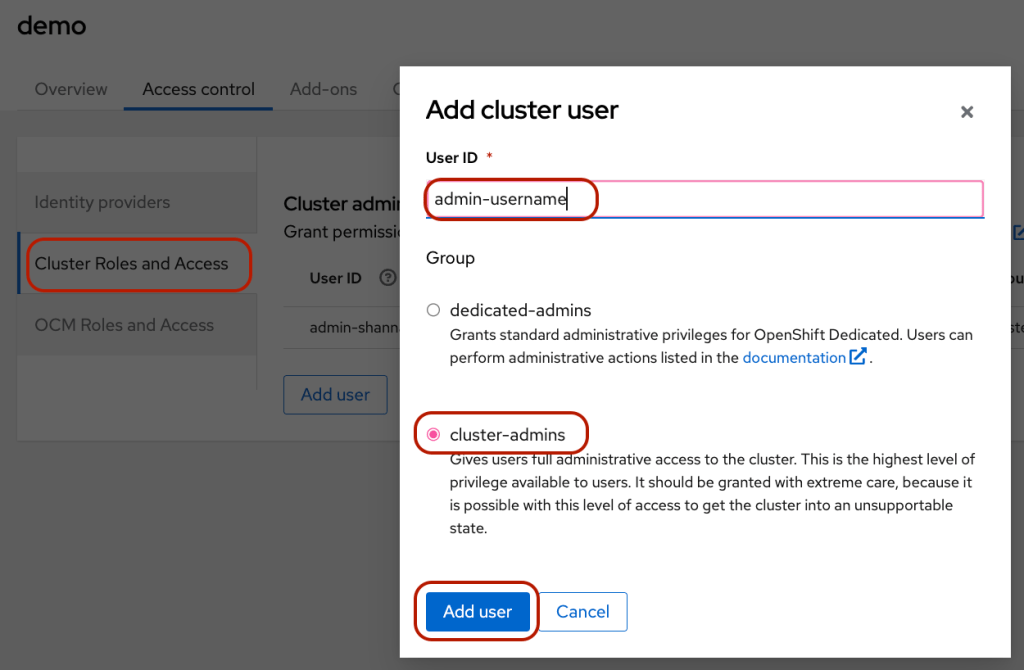
- Click on the “Cluster Roles and Access” side tab –> click “Add user” –> select “cluster-admin” –> add the newly added admin username under the User ID.
- Click the blue “Open console” button to log in to OpenShift Console using the newly created user.

- I used the ROSA documentation to configure the ACK servicer controller for S3, and I made some minor modifications since I found some mistakes on the docs. I used CLI to install and configure the Operator and recorded the steps here.
$ oc login -u <admin-user> <api-url>
$ export CLUSTER_NAME=$(oc get infrastructure cluster -o=jsonpath="{.status.infrastructureName}" | sed 's/-[a-z0-9]{5}$//')
$ export REGION=$(rosa describe cluster -c ${CLUSTER_NAME} --output json | jq -r .region.id)
$ export OIDC_ENDPOINT=$(oc get authentication.config.openshift.io cluster -o json | jq -r .spec.serviceAccountIssuer | sed 's|^https://||')
$ export AWS_ACCOUNT_ID=aws sts get-caller-identity --query Account --output text
$ export ACK_SERVICE=s3
$ export ACK_SERVICE_ACCOUNT=ack-${ACK_SERVICE}-controller
$ export POLICY_ARN=arn:aws:iam::aws:policy/AmazonS3FullAccess
$ export AWS_PAGER=""
$ export SCRATCH="./tmp/${ROSA_CLUSTER_NAME}/ack"
$ mkdir -p ${SCRATCH}
Make sure you use the consistent variable names.
- Create a trust policy for ACK operator
$ cat <<EOF > "${SCRATCH}/trust-policy.json"
{
 "Version": "2012-10-17",
 "Statement": [
 {
 "Effect": "Allow",
 "Condition": {
   "StringEquals" : {
     "${OIDC_ENDPOINT}:sub": "system:serviceaccount:ack-system:${ACK_SERVICE_ACCOUNT}"
   }
 },
 "Principal": {
   "Federated": "arn:aws:iam::$AWS_ACCOUNT_ID:oidc-provider/${OIDC_ENDPOINT}"
 },
 "Action": "sts:AssumeRoleWithWebIdentity"
 }
 ]
}
EOF
- Create AWS IAM ROLE for the ACK operator
$ ROLE_ARN=$(aws iam create-role --role-name "ack-${ACK_SERVICE}-controller" \
   --assume-role-policy-document "file://${SCRATCH}/trust-policy.json" \
   --query Role.Arn --output text)
$ aws iam attach-role-policy --role-name "ack-${ACK_SERVICE}-controller" \
     --policy-arn ${POLICY_ARN}
- Configure OpenShift to install ACK operator
$ oc new-project ack-system

## note I added RECONCILE_DEFAULT_MAX_CONCURRENT_SYNCS to the configmap
$ cat <<EOF > "${SCRATCH}/config.txt"
ACK_ENABLE_DEVELOPMENT_LOGGING=true
ACK_LOG_LEVEL=debug
ACK_WATCH_NAMESPACE=
AWS_REGION=${REGION}
AWS_ENDPOINT_URL=
ACK_RESOURCE_TAGS=${CLUSTER_NAME}
ENABLE_LEADER_ELECTION=true
LEADER_ELECTION_NAMESPACE=
RECONCILE_DEFAULT_MAX_CONCURRENT_SYNCS='1'
EOF
$ oc -n ack-system create configmap \
  --from-env-file=${SCRATCH}/config.txt ack-${ACK_SERVICE}-user-config
- Install ACK S3 operator from OperatorHub
$ cat << EOF | oc apply -f -
apiVersion: operators.coreos.com/v1
kind: OperatorGroup
metadata:
  name: ack-${ACK_SERVICE}-controller
  namespace: ack-system
spec:
  upgradeStrategy: Default
---
apiVersion: operators.coreos.com/v1alpha1
kind: Subscription
metadata:
  name: ack-${ACK_SERVICE}-controller
  namespace: ack-system
spec:
  channel: alpha
  installPlanApproval: Automatic
  name: ack-${ACK_SERVICE}-controller
  source: community-operators
  sourceNamespace: openshift-marketplace
EOF
- Annotate the ACK S3 Operator service account with the AWS IAM role
$ oc create sa ack-s3-controller
$ oc -n ack-system annotate serviceaccount ${ACK_SERVICE_ACCOUNT} \
  eks.amazonaws.com/role-arn=${ROLE_ARN} && \
  oc -n ack-system rollout restart deployment ack-${ACK_SERVICE}-controller
- Validate the operator pod
$ oc -n ack-system get pods
NAME                                READY   STATUS    RESTARTS   AGE
ack-s3-controller-5785d5fbc-qv86g   1/1     Running   0          129
- Create a S3 bucket via ACK S3 operator
- Login to OpenShift console -> click Operators on the left nav -> Installed Operators

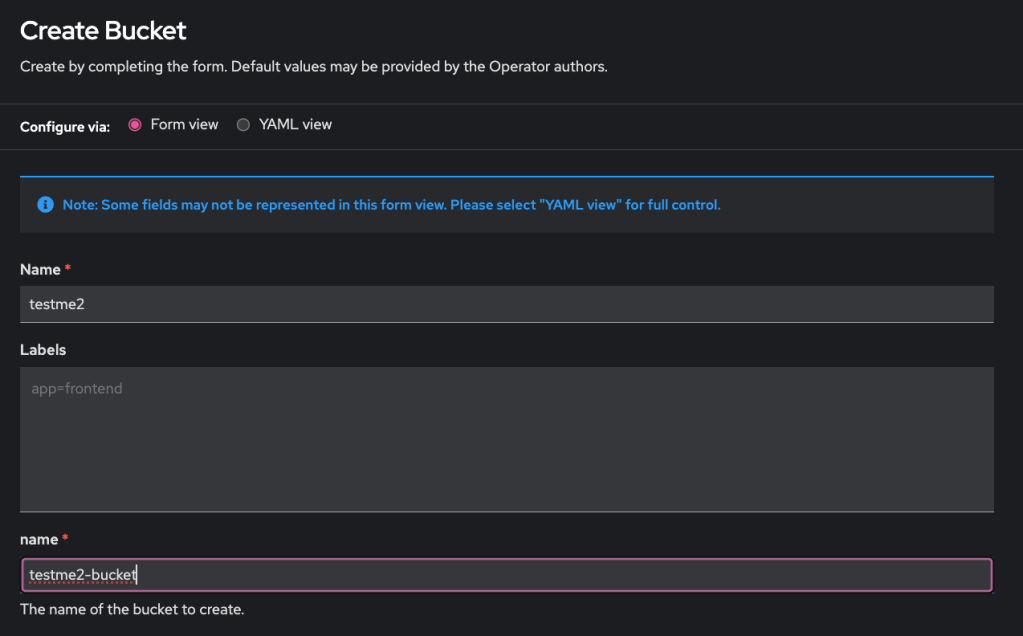
- Click Bucket link –> click Create Bucket
- Enter the CR’s and the bucket’s name –> click Create at the bottom of the page.
- Bucket created
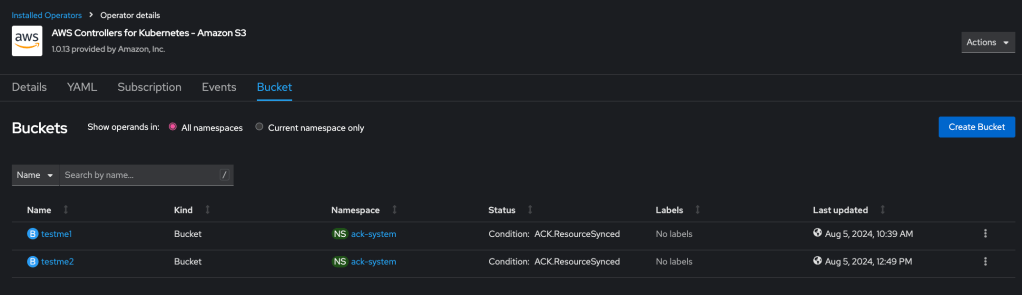
- List it using AWS S3 CLI
$ aws s3 ls
2024-08-05 10:39:25 testme1
2024-08-05 12:49:13 testme2-bucket
Congratulation! You have created an S3 bucket via the ACK service controller.
Reference:
- ROSA documentation: https://docs.openshift.com/rosa/cloud_experts_tutorials/cloud-experts-using-aws-ack.html
- Community documentation: https://aws-controllers-k8s.github.io/community/docs/user-docs/openshift/
- Red Hat Hybrid Cloud Console: https://console.redhat.com/

 OpenShift Lessons Learned